


I check the weather almost every morning, and I have never once wanted the weather. What I actually want is a time.
Should I ride now or wait until seven? Is the afternoon walk going to be miserable? Is tomorrow morning better than this evening for the long run? Every one of those questions ends in a time, and every weather app answers with a table.
So I built the thing that skips the table. It is called Gwhen — short for “Go When.”
Weather is complicated. Gwhen isn't.
The problem is interpretation, not data
Forecast data has been effectively solved. Hourly temperature, wind, precipitation probability, humidity, UV, air quality — all of it is available, accurate enough, and free or nearly free through public APIs.
What has not been solved is interpretation. A conventional weather app hands you twenty-four rows of numbers and quietly makes the interpretation your job. You scan the hours, mentally weigh temperature against wind against rain, remember that you hate riding above 24 km/h of headwind, and eventually arrive at a decision.
That is a surprising amount of cognitive work for a decision you make every day. And the maddening part is that the app already had everything it needed to make it for you.
What Gwhen actually does
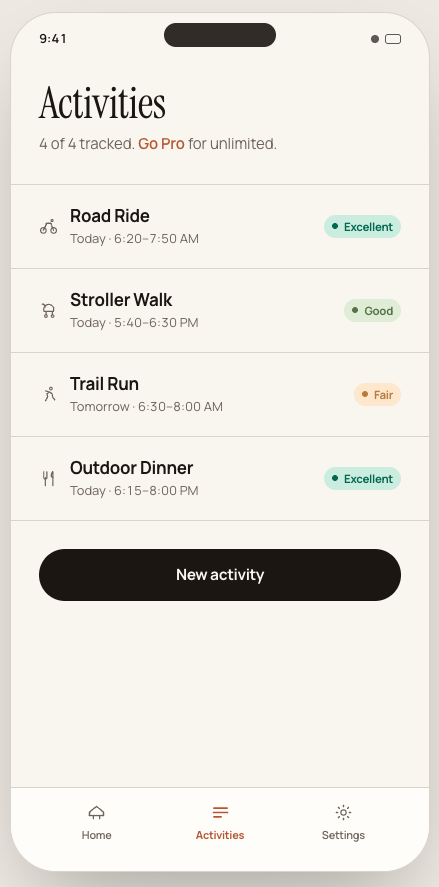
You tell Gwhen what you want to do — a road ride, a run, a stroller walk, tennis, a hike, dinner outside, photography, yard work. Gwhen reads the forecast for you and returns the best window for that specific thing.
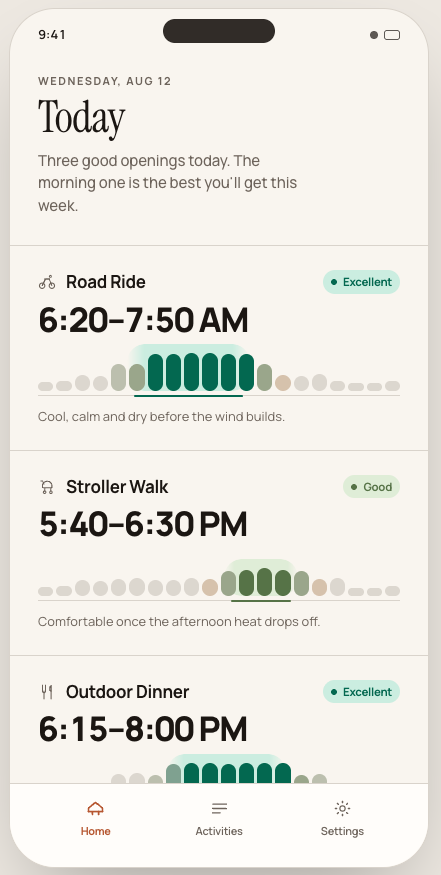
The home screen opens on a single line of plain language — something like “Three good openings today. The morning one is the best you’ll get this week.” — followed by the windows themselves, each labelled with a verdict rather than a score: Excellent, Good, Fair, or nothing worth leaving the house for.
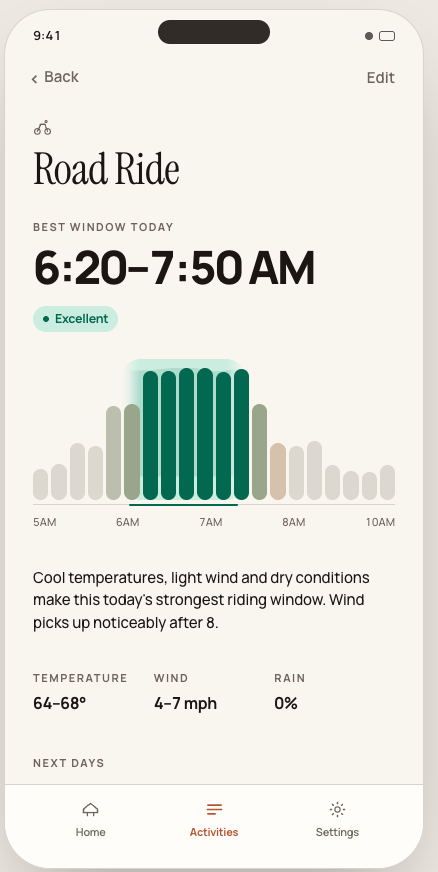
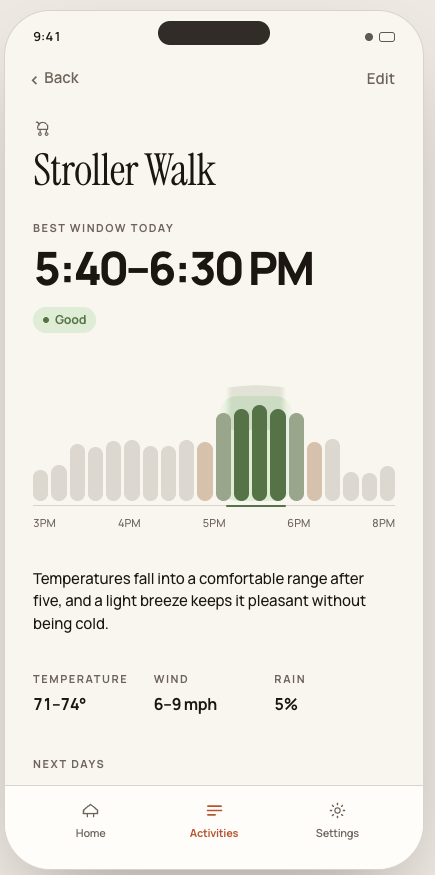
1Road Ride2 3Best Window46:20 - 7:50 AM5 6Excellent764-68°F · Wind 4-7 mph · No rainOne screen, one decision. A road ride at 6:20 and a stroller walk at 5:40 in the evening are two entirely different answers to two entirely different questions, and the app treats them that way.
The time is the headline. The weather values sit underneath in small type, because their only job is to explain the recommendation. If you deleted every temperature and wind value from the screen, you would still know exactly when to go. That is the design test the whole product has to pass.
The window is the product
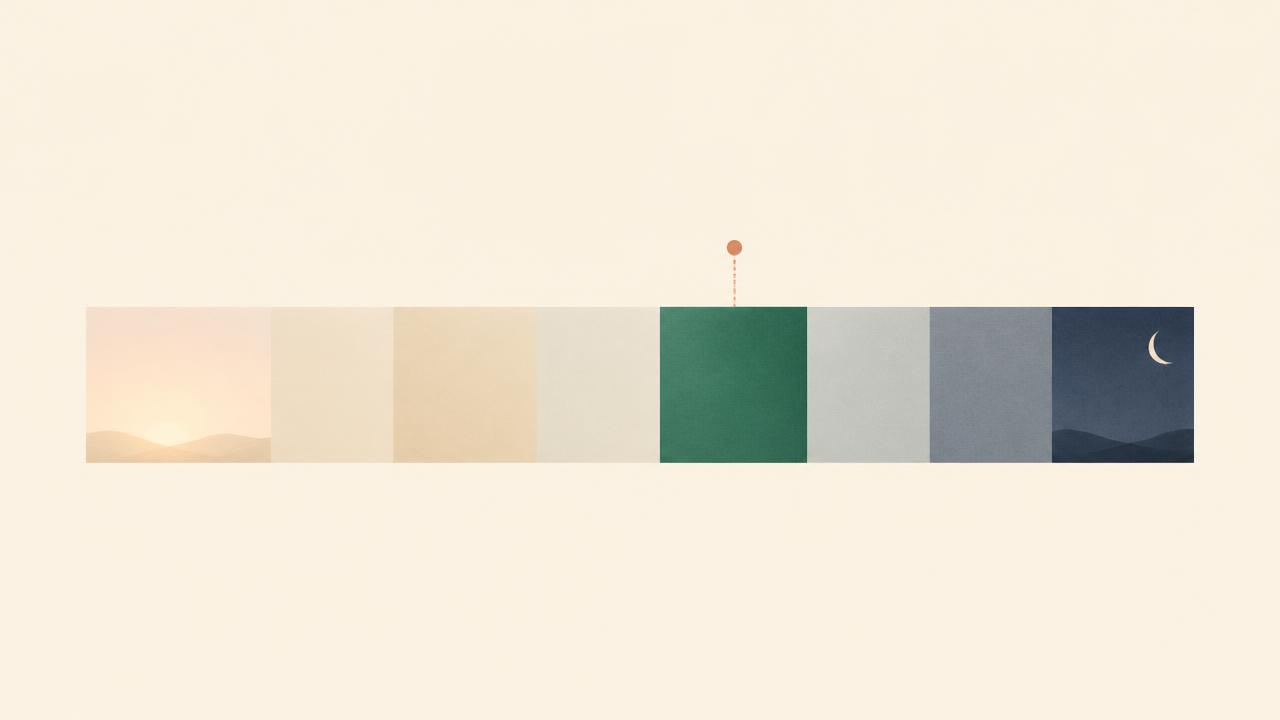
The core component is a timeline that renders a day as a continuous period rather than a bar chart. Conditions move through four states — closed, opening, ideal, closing — and the recommended stretch lifts out of the day with a soft silhouette, so you read the shape of the morning before you read a single number.
Getting there took three explorations. The first two looked like charts. Charts invite comparison, and comparison is exactly the work I was trying to remove. The version that shipped keeps the organic variation of individual time segments, so you can still see the day has texture, but connects the recommended segments with one continuous shape.
The same component is reused everywhere: the home row, the activity detail view, and eventually the widget and Live Activity. One recognizable visual across every surface.
Three rules the interface has to obey
One answer, not a dashboard
No pressure charts, no hourly scrolling, no radar loop you have to squint at. Gwhen names the time and tells you why in a sentence. Everything else is a footnote or it is deleted.
Tuned to your activity
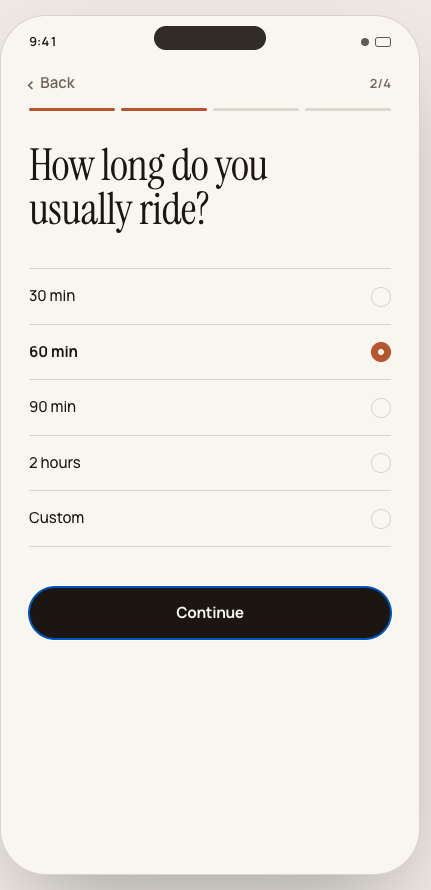
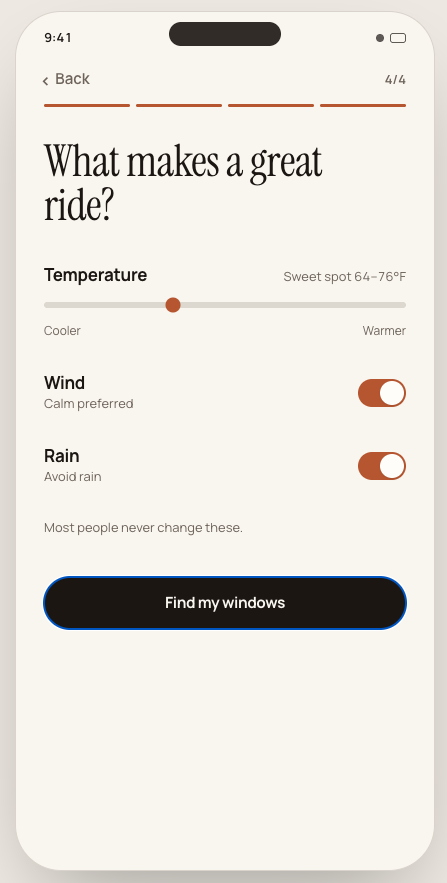
A road ride and a stroller walk want different weather. 58°F and a light breeze is a great ride and a cold walk with a toddler. You set thresholds once per activity — temperature range, wind tolerance, rain tolerance, daylight, minimum duration — and Gwhen judges every hour against that profile instead of against a generic notion of “nice out.”
Honest when it’s bad
This one matters most. When nothing in the next two days is genuinely good, Gwhen says so — and then shows the least-bad option instead of dressing up a mediocre hour as a recommendation. An app that always finds a great window is an app you stop believing after a week.
A harder forecast to read
There is another reason the interpretation problem matters more now. The weather is becoming less predictable. Heat arrives earlier, storms build faster, and the comfortable windows in a day are getting narrower and more fragile.
That does not make Gwhen an environmental app. It makes it a practical one. When the forecast shifts between breakfast and lunch, you do not need more data — you need a faster answer. The cost of misreading the weather is no longer a damp bike ride; it is a cancelled run, a ruined picnic, or a toddler stuck in a thunderstorm.
A tool that reads the forecast for you and names the single best window is useful on a calm day. On a volatile day, it becomes the difference between going and not going. The honesty matters even more here: when nothing is good, Gwhen says so, and when a window opens, it catches it before you do.
Built for the glance, not the session
Gwhen is designed for iOS first, and specifically for the surfaces where you never actually open an app: the Lock Screen, the Dynamic Island and Live Activities. The best version of this product is a line on your Lock Screen at 5:45 AM that reads “Ride 6:20–7:50 · Excellent” and never needs to be tapped.
Widgets and a Live Activity during the window itself are the natural extension. If the forecast shifts and the opening moves twenty minutes earlier, that update should reach you where you already are rather than waiting for you to remember to check.
The Live Activity counts down rather than up: hours, minutes and seconds until the good stretch begins, with the condition state and the shape of the window travelling alongside it. If the forecast moves the window, the countdown quietly re-targets instead of going stale.
1Gwhen · Road Ride Excellent2 3Opens in46:21:025 66:20 - 7:50 AM7calm · 52° · dryFour condition states, no scores
Every interval in the forecast is graded against your thresholds and lands in one of four states. No 0–100 score, no five-star rating — just a verdict you can act on.
| State | What it means |
|---|---|
| Excellent | Everything lines up. Go. |
| Good | Comfortable, with one soft caveat. |
| Fair | Doable if you're motivated. |
| Poor | Gwhen won't pretend otherwise. |
The window has to fit your day, not just the sky
A perfect 10 AM window is useless if you are in a meeting. So Gwhen can look at your calendar and the weather at the same time, and recommend an opening that already fits the free space in your day — around meetings, focus time, school runs and everything else that actually governs when you can leave the house.
Google Calendar, Outlook and Apple Calendar all connect. Calendar access is used for one thing only: finding free gaps. Nothing is stored to build a profile, and nothing is sold.
Why it is called Gwhen
The app started life under a working title of “Window.” It described the concept perfectly and was hopeless as a name — unsearchable, generic, and already the name of roughly everything in software.
Gwhen is a contraction of “Go When.” It is short, typeable, unclaimed, and it says the product's entire value proposition out loud. The question is not what the weather is. The question is when to go.
The engineering decisions that mattered
Scoring is deterministic
There is no language model deciding when you should ride. Each activity carries a profile — acceptable temperature range, wind tolerance, rain tolerance, daylight requirement, minimum duration — and each forecast hour gets scored against that profile. The scores are smoothed across neighbouring hours, and the strongest contiguous interval that satisfies your available time becomes the window.
This is the same conclusion I reached while building tinymissions: the moment a recommendation goes through a model at runtime, it becomes slow, expensive, non-reproducible and impossible to explain. A deterministic scorer gives the same answer twice, runs instantly, and can always tell you why.
Building tinymissions: Why I Removed AI from the Critical PathThe same argument, applied to a different productThe explanation is generated from the score
Every window comes with one sentence of plain language: “Cool temperatures, low wind and dry conditions make this the strongest riding window tomorrow.” That sentence is assembled from the factors that actually drove the score, not written by a model. It is short, honest, and it never invents a reason.
Windows shift, they don't jump
Forecasts change. When the best window moves from 6:20 to 6:40, the interface animates the interval into its new position rather than swapping one number for another. Motion carries the meaning: something changed, and here is how much.
Weather stays in the basement
No hero weather illustrations. No animated clouds. No sixteen-metric dashboard. Three values, maximum, and only when they explain the recommendation. The design brief has one instruction that governs everything else: make it look less like a weather app, not more.
| Conventional weather app | Gwhen |
|---|---|
| Shows 24 hours of data | Shows one interval |
| You interpret the forecast | The app interprets it for you |
| Optimises for metrics on screen | Optimises for a decision |
| Weather is the content | Weather is the footnote |
| Generic for everyone | Scored per activity and per person |
What it does not do
Gwhen does not have a chat interface. It does not have a feed. It does not have streaks, badges, or a social layer. It does not try to become your training log or your calendar.
The pricing follows the same logic: free to decide, Pro to plan. The free tier gives you one saved activity, today's recommended window, the plain-language reasoning behind it, and light and dark mode — a complete, honest answer, not a crippled demo. Pro is $3.99 a month or $29 a year and adds unlimited activities, a seven-day outlook per activity, custom thresholds, Lock Screen alerts and Live Activities, and multiple locations.
No ads, no data resale, no upsell theatre inside the app. No countdown timers, no dark patterns — the product should be confident enough not to shout.
The metric I care about
Most apps chase time in app. Gwhen chases the opposite. The ideal session is about four seconds long: open, read a time, close the phone, go outside.
If the app becomes something you browse, I have built the wrong thing. It should behave like a household utility — there when you need it, invisible the rest of the time.
I don't need to check the weather. Gwhen already figured it out.
Where it is now
The full interface is designed and prototyped end to end — home, activity detail, creation flow, tuning, alerts, paywall and settings — in both light and dark mode, with a documented design system covering tokens, typography, spacing, radii and motion so the React Native build has nothing left to guess at.
Next up is the native implementation and the forecast pipeline behind it. I will write about the scoring model itself once it has survived a few weeks of real mornings.
The product site lives at gwhen.app — that is where the beta signup, the screenshots and the launch notes will land first.
gwhen.app — the official Gwhen websiteBeta updates, screenshots and release notesGwhen — Go When
One question, one answer: the best time today to do the thing you actually want to do. Subscribe below and I'll let you know when the beta opens.
Download links will be added here once the app is available.