


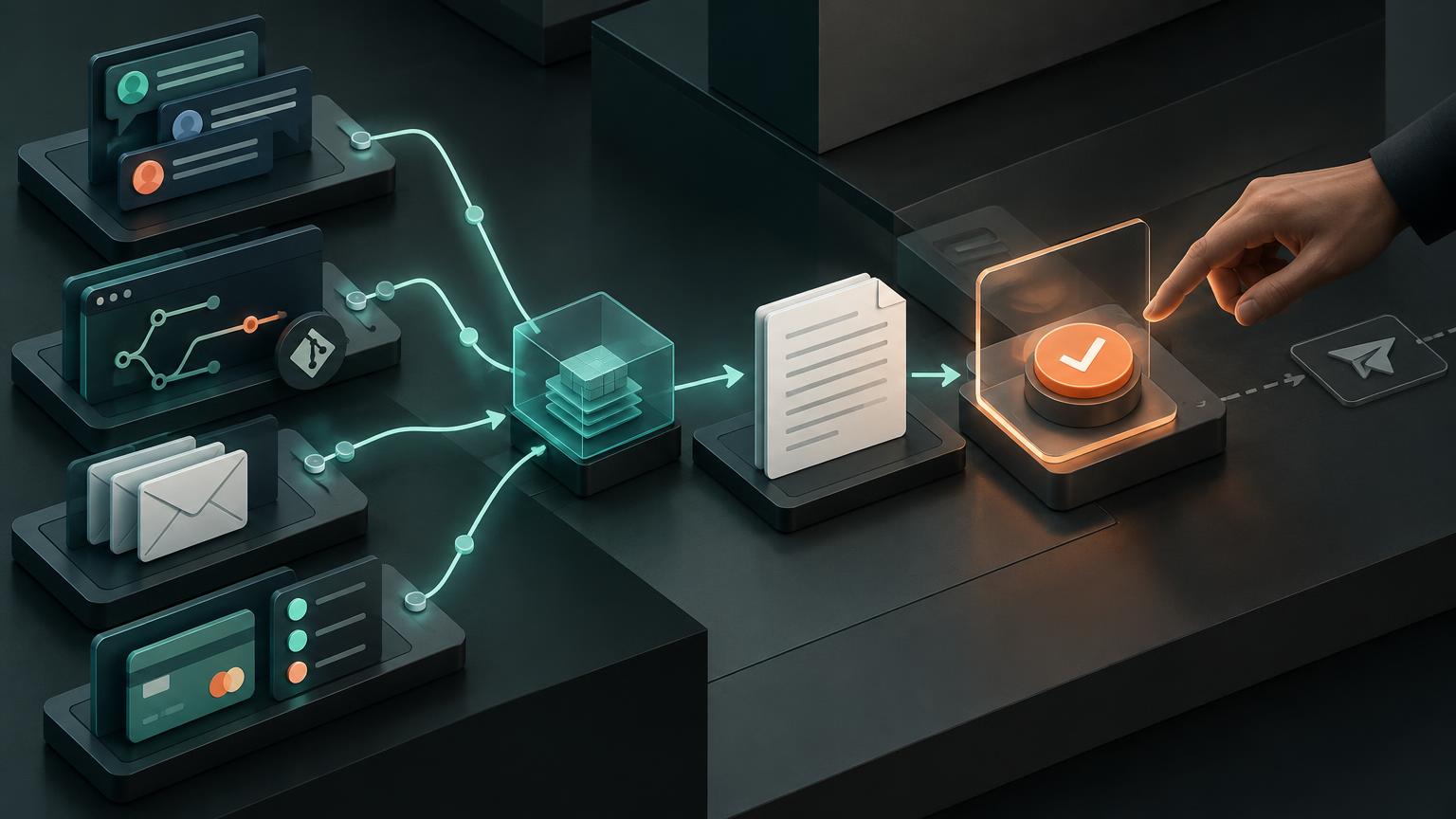
I did not want another chatbot. I wanted a small operations layer: something that could notice a question, investigate it across the systems where the answer actually lives, and prepare a response without quietly becoming authorized to speak for the team.
That distinction changed the whole design. The valuable part is not that an AI can write a polished reply. The valuable part is that ChatGPT can traverse several authorized systems, select only the sources relevant to this question, reconcile the evidence, and make uncertainty visible before a person decides what happens next.
Teammate asks → ChatGPT investigates → ChatGPT drafts → human reviews → human sends.
Investigate first, draft second
Most assistant demos collapse investigation and response into one move: read a message and answer it. That is convenient, but it hides the hard part. A backoffice question often spans conversation history, implementation details, customer evidence, and incomplete assumptions. The system needs to know when to search each source — and when not to.
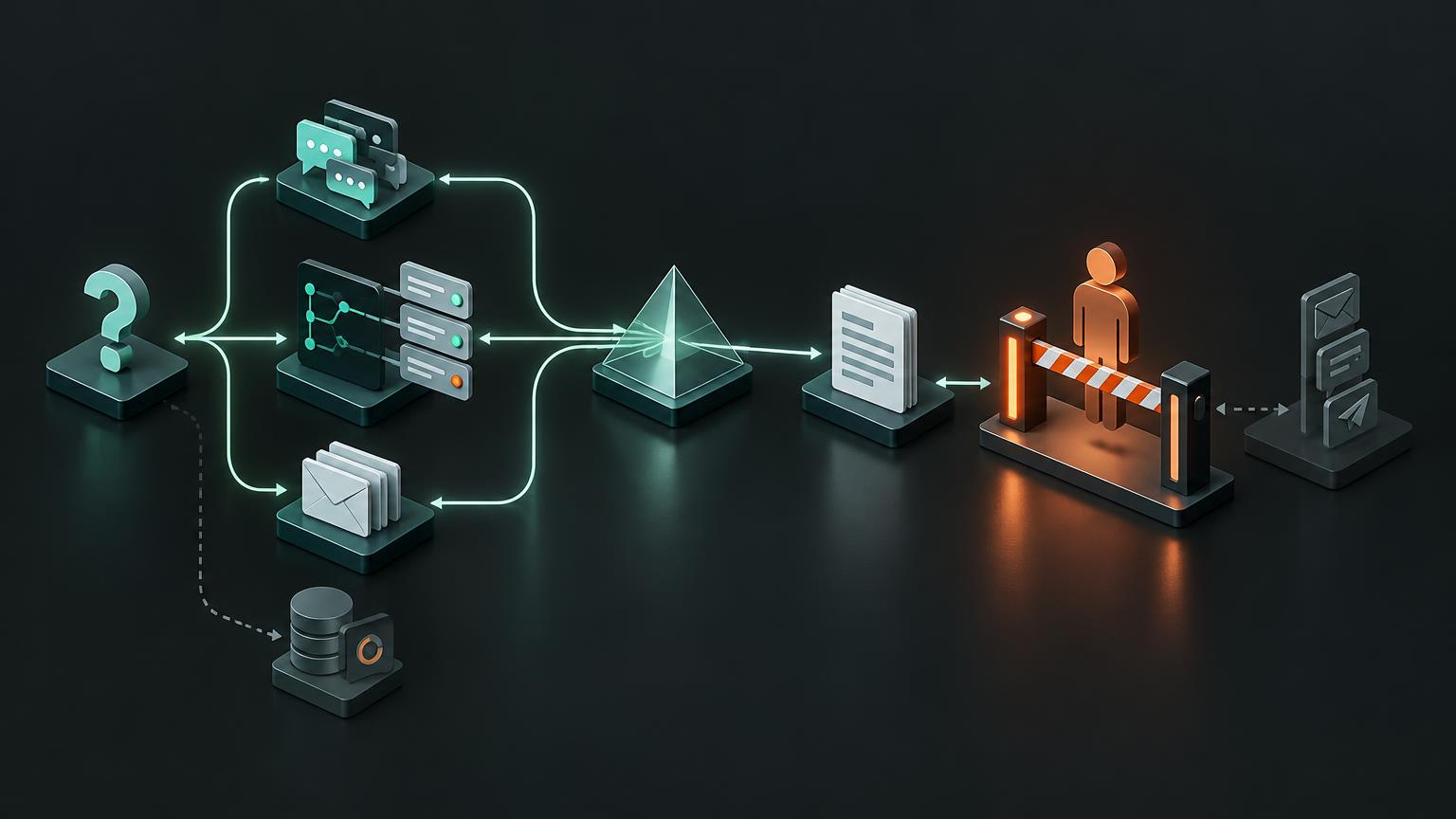
I treat the prompt as a routing decision. Start with the operational question. Read the surrounding Slack thread. Search prior decisions if the answer depends on history. Inspect GitHub only when a technical claim needs verification. Consult Outlook only when customer or support evidence matters. Then synthesize what is known, what is inferred, and what still needs confirmation.
Selective evidence routing
One question. Only the sources that can answer it.
What plugins and connected apps mean here
OpenAI's current terminology separates the package from the connection. Plugins can package skills, connected apps, and reusable templates. Apps connect ChatGPT to external services such as Slack or Outlook so it can search, reference, and — where the workspace and permissions allow it — take supported actions.
This is not a permission bypass. ChatGPT can only work with information the connected account and workspace allow it to access. Availability and exact capabilities vary by ChatGPT plan, region, workspace and admin settings, interface, and the permissions granted to each app. Third-party services also keep their own retention, residency, and access rules.
OpenAI references: plugins and connected apps
Four sources, four different jobs
Slack is the operational context layer
Slack is where a new question appears and where much of its history lives. The workflow reads the thread, searches prior discussions and decisions, and inspects only the messages or permitted files needed to understand the issue. Slack can support search and selected actions depending on permissions, but this workflow deliberately uses it for evidence gathering, not autonomous replies.
OpenAI Help — Using Slack in ChatGPTCurrent capabilities, availability, permissions, and workspace controls for the Slack app.GitHub verifies technical claims
When a question is about what the product actually does, conversation history is not enough. The implementation is the source of truth. The workflow can inspect the relevant repository, trace a field through the code, and consult issues or pull requests when they provide useful context. If the question is nontechnical, GitHub stays out of the path entirely.
Outlook supplies support history
Outlook adds customer and support history when that evidence is relevant. The Outlook Email app can search and reference messages, and OpenAI documents draft-reply workflows where enabled. I use the same boundary here: creating a draft can be useful; sending it remains a human action. Shared or delegated mailboxes still depend on the Microsoft account already having the appropriate access.
OpenAI references: Outlook Email
Payment context is optional and secondary
A payment system such as Stripe can answer a narrow question: is this customer active, trialing, past due, or unknown? That context can prevent a misleading support draft, but it should not become a general-purpose data grab. Ask for the smallest status signal needed, avoid copying sensitive payment details into the conversation, and keep it out of the workflow when it is irrelevant.
The hourly monitoring loop
This use case does not need a real-time event pipeline. An hourly scheduled task is enough. It checks for new questions or unresolved threads, deduplicates work it has already seen, and exits quietly when nothing needs attention. Silence is a feature: no empty status notification, no artificial sense of activity.
Hourly monitor
Silence is a valid result.
1Every hour:21. Find unresolved questions32. Skip handled thread IDs43. Select only needed sources54. Return:6 • concise brief7 • evidence8 • uncertainty9 • ready-to-send draft105. If nothing needs action: silence116. Never send, edit code,12 or make an external commitmentOpenAI's scheduled tasks support recurring monitoring and, for supported apps and eligible accounts, app-connected workflows involving services such as Slack and GitHub. Exact support depends on the account, workspace, model, interface, and admin configuration, so I treat the documentation as the source of truth rather than assuming every installation has the same surface area.
OpenAI Help — Scheduled tasks in ChatGPTRecurring tasks, monitoring, supported app connections, and current availability constraints.A real investigation, anonymized
A teammate asked why several fields appeared to be missing from a recurring report. They also wanted to know whether a set of new category labels required a schema change. It sounded like one question, but it contained three different hypotheses: the source data might be missing, the transformation might be dropping fields, or the display layer might be rendering valid data incorrectly.
The workflow began in Slack. It read the question in context and found an earlier discussion about how the report joined two streams of operational data. That history was useful, but it was not enough to answer whether the current implementation still behaved that way.
GitHub provided the verification. The implementation showed how records were correlated across logs and structured data, then mapped into the recurring report. Following that path revealed that the new category labels already flowed through an existing field. There was no evidence that the schema needed to change.
The investigation also found a smaller but more concrete problem: one label arrived HTML-encoded. The system compared & with &, so visually identical values could fail to match. That was a rendering and normalization issue, not proof of a missing field or a schema limitation.
That draft was useful because it separated evidence from uncertainty. It explained what had been verified, named the likely defect, and avoided promising a schema change before anyone had confirmed whether the underlying record existed. A fluent answer would have been easy. A defensible answer required moving between systems.
The same pattern works for support email
The second workflow starts with a new customer email. It identifies the sender and immediate context, searches Slack for relevant product or customer history, optionally checks a narrow payment-state signal, detects the language of the message, and creates an Outlook reply draft for review.
1New customer email2 → identify sender + context3 → search relevant Slack history4 → optionally check payment state5 → detect language6 → create Outlook reply draft7 → human reviews and sendsThis can also run hourly. Store a stable identifier for each handled message or thread, refuse to recreate drafts for identifiers already processed, and record enough provenance to show which sources informed the response. If the evidence conflicts, the output should say so. If permissions do not allow draft creation, return the proposed reply in the task result instead of attempting another action.
The send button is the product boundary
Keeping the workflow draft-only is not a temporary limitation. It is the core architecture. Sending a message changes an external relationship. It can promise a timeline, disclose information, create legal or commercial expectations, or simply strike the wrong tone. Those consequences are not equivalent to reading evidence and preparing a draft.
Evidence + draft
Human review
Explicit send
No action crosses this boundary by itself
- Read narrowly: use only sources relevant to the current question.
- Separate evidence, inference, and uncertainty in the result.
- Never send Slack messages or customer emails automatically.
- Never modify code, repositories, customer records, or payment state.
- Never make a timeline, pricing, policy, or product commitment.
- Require an explicit human action before anything leaves the draft state.
The model can do more investigation than a simple notification rule and less action than a fully autonomous agent. That middle ground is exactly why the system is useful. It absorbs the expensive context gathering while preserving accountability at the point of consequence.
Practical setup checklist
- Define the workflow contract in one sentence: investigate, draft, stop.
- Connect only the apps required for the workflow and grant the minimum practical permissions.
- Write routing rules for when Slack, GitHub, Outlook, or payment context may be consulted.
- Require citations or concise source notes for consequential claims.
- Make uncertainty a first-class field, not a footnote hidden in prose.
- Deduplicate by stable message or thread identifiers before creating work.
- Return nothing when the hourly run finds no actionable item.
- Test missing access, conflicting evidence, encoded text, and absent source records.
- Keep outbound communication and code changes behind explicit human approval.
- Review OpenAI and third-party documentation for plan, region, workspace, admin, and permission changes before rollout.
What I would add next
The next useful improvement is not another action. It is better provenance: a compact evidence ledger showing which thread, implementation location, or message supported each conclusion. I would also add an escalation rule for conflicting sources, a retention policy for task results, and a small evaluation set built from previously resolved questions.
There are real limitations. Search can miss context. Repository access can be incomplete. Email history can reflect an outdated promise. Permissions differ across organizations. Scheduled tasks and app actions are not uniformly available. The workflow should degrade visibly: report the missing source, narrow the claim, and ask for review rather than filling the gap with confidence.
Useful because it can stop
I started with a modest goal: reduce the time between a teammate asking a question and receiving a well-supported answer. The result feels less like a chatbot and more like a thin operations layer over the systems the team already uses.
Its most important capability is not writing, searching, or scheduling. It is knowing where the workflow ends. ChatGPT investigates. ChatGPT drafts. A person reviews the evidence, owns the judgment, and presses send.