


Most video AI tutorials start with an API key and a SDK. This series starts with a conversation. In this first chapter you will connect TwelveLabs' Jockey agent to ChatGPT through the official plugin, upload three short clips you recorded yourself, and learn — by asking real questions — what search, analysis, and agent retrieval actually feel like. Only then will you write the brief that turns the experiment into your own repository in chapter two.
What you will do
- Connect the official Jockey plugin to ChatGPT — no API key, no repository, no code
- Create a knowledge store, upload three clips you own, and verify they are ready
- Run five corpus-specific questions, including one whose honest answer is “nothing”
- Get a proposed highlight sequence, ask for it a second time to see how far the answer moves, and check its timestamps by hand
- End with a written brief for your AI coding partner: problem, inputs, outputs, acceptance tests, unknowns
Prerequisites and the cost/data gate
- A ChatGPT account and a TwelveLabs account (the plugin sign-in links them)
- Three short tabletop clips you recorded and own — the same corpus the whole series uses; 20–40 seconds each, phone camera is fine
- Before uploading: inspect your current TwelveLabs plan, storage, and Workload usage in the portal, and understand that selected media goes to TwelveLabs and results come back into ChatGPT
- No secrets in prompts, ever — the plugin handles authentication; you never paste an API key into a chat
One honest caveat up front: plugin UI and access can vary by app, plan, and workspace. The steps below follow TwelveLabs' current official guide (September 29, 2026); if your ChatGPT looks different, the guide and the portal are the sources of truth, not this article. And no plan promises unlimited or free-forever use — check yours.
Step 1 — Connect the official plugin
The primary route is the official Jockey plugin, not a manual MCP setup. Open the ChatGPT Plugins directory, search for Jockey, click the + beside “Jockey by TwelveLabs”, and complete the TwelveLabs sign-in. Then start a new chat. You review the permission grant yourself as part of connecting — read what you are authorizing before you accept.
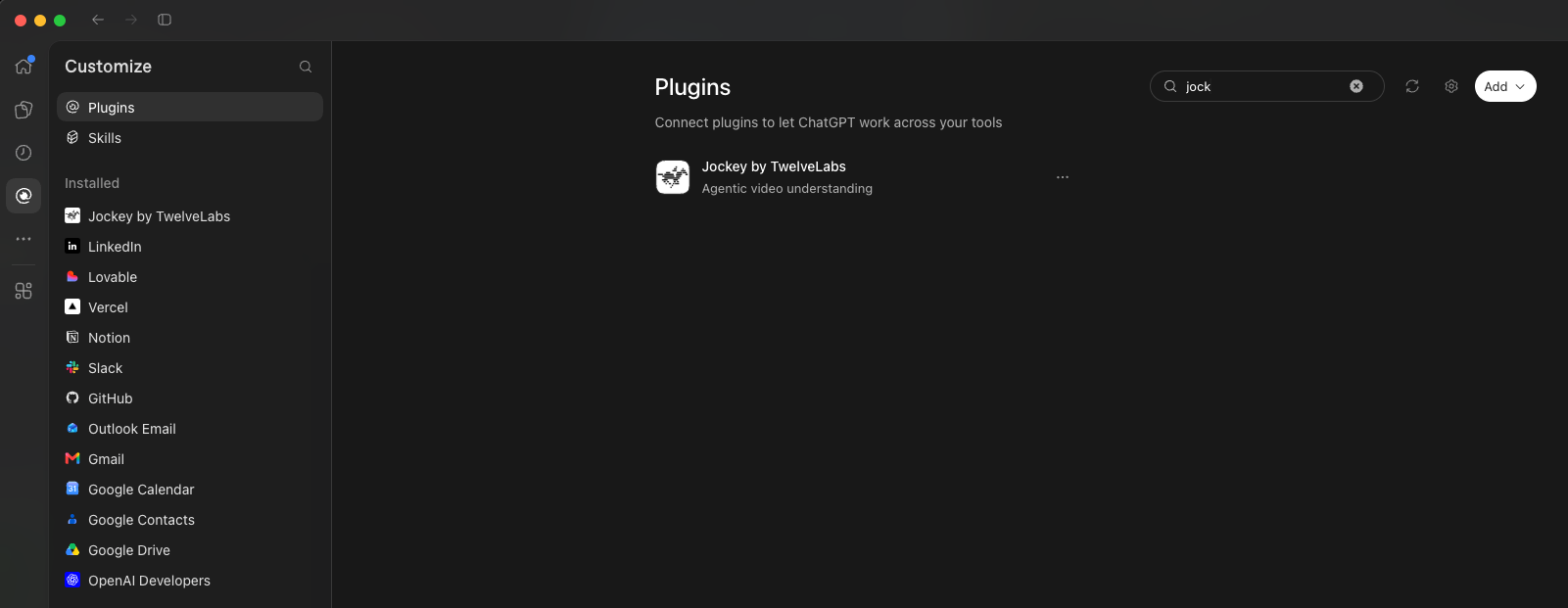
Your first prompt is deliberately boring, because it proves the connection without changing anything:
Use Jockey to list the knowledge stores I can access. Report whether the call succeeds. Don't create a store or add media yet.An empty list is a successful answer: it means authentication worked and you simply have no stores yet. This is the first tool-effect lesson of the series — listing is read-only; creating stores and adding media are writes. Know which one you are asking for.
Step 2 — Create a store and upload your clips
Choose your footage: owned clips or licensed sample trailers
The three reader-recorded tabletop clips remain the repeatable ground-truth path for the exercises below. If you want downloadable footage first, choose either or both of these compact CC BY 3.0 trailers. Download them yourself from the links below, watch them locally, and review the cost/data gate before uploading to Jockey. The download sizes fit a small browser upload; your platform's current limits still apply. These are film examples, not footage you own or prevalidated model benchmarks.
Sintel trailer — sintel_trailer-720p.mp4: 52.208 seconds, 7,608,204 bytes (about 7.6 MB), 1280 × 720, H.264 video / AAC audio. Sampled frames show mountains, a traveler, a bearded man, a dragon, and desert settings. Credit: © copyright Blender Foundation | www.sintel.org. Licensed under CC BY 3.0.
Sintel download and attribution
Big Buck Bunny trailer — big-buck-bunny-trailer-480p.mp4: 36.720 seconds, 3,000,644 bytes (about 3 MB), actual dimensions 720 × 400 despite the filename, H.264 video / AAC audio. Sampled frames show a rabbit, rodents, a butterfly, and title cards. Credit: (c) copyright 2008, Blender Foundation / www.bigbuckbunny.org. Licensed under CC BY 3.0.
Big Buck Bunny download and attribution
- Sintel suggested prompts: “Find the snowy mountain scenes” and “Describe the sequence of settings and return timestamps.”
- Big Buck Bunny suggested prompts: “Find the large rabbit standing in grass” and “Extract the visible title cards in order.”
- These prompts have not been validated against the models. Watch the source and check every returned observation and timestamp yourself; no expected results or timestamps are supplied.
Download availability, media properties, and sampled frames were verified on October 17, 2026; that is a file check, not a model test. TwelveLabs uses the original Sintel, Big Buck Bunny, and Elephants Dream films in its Mosaic AI article. These trailers are compact counterparts, not the exact tutorial files, and are not claimed to be the most popular or best-performing corpus. Keep the credits and source/license URLs alongside your local assets; note any trimming or other modifications. Add files manually to your own local lab folder, not this website or my companion repository; keep media gitignored. These small files need no Git LFS setup.
Film context and the next step
Create a Jockey knowledge store named Video Lab. Give me its upload link so I can add my sample videos.Open the uploader link Jockey returns and add your chosen clips yourself — the three owned tabletop recordings, or the licensed trailer selection above. Uploading is asynchronous: a clip is not queryable the moment it finishes transferring. Check readiness explicitly:
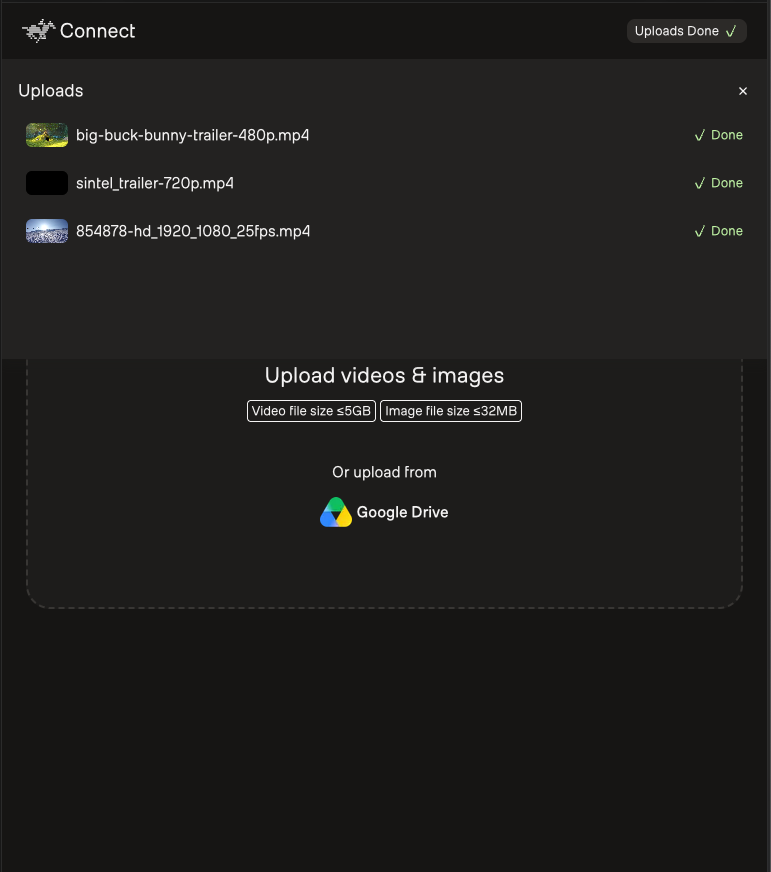
Check Video Lab. List each item's title and processing status. Tell me which uploaded items are ready to query.If an item is still processing, wait and ask again — a single status check is a snapshot, not a promise of background monitoring. If an item fails, re-upload that one clip. You will meet this same pattern in code in chapter four, where readiness is polled per item because a store has no aggregate “ready” flag.
Step 3 — Interrogate the corpus
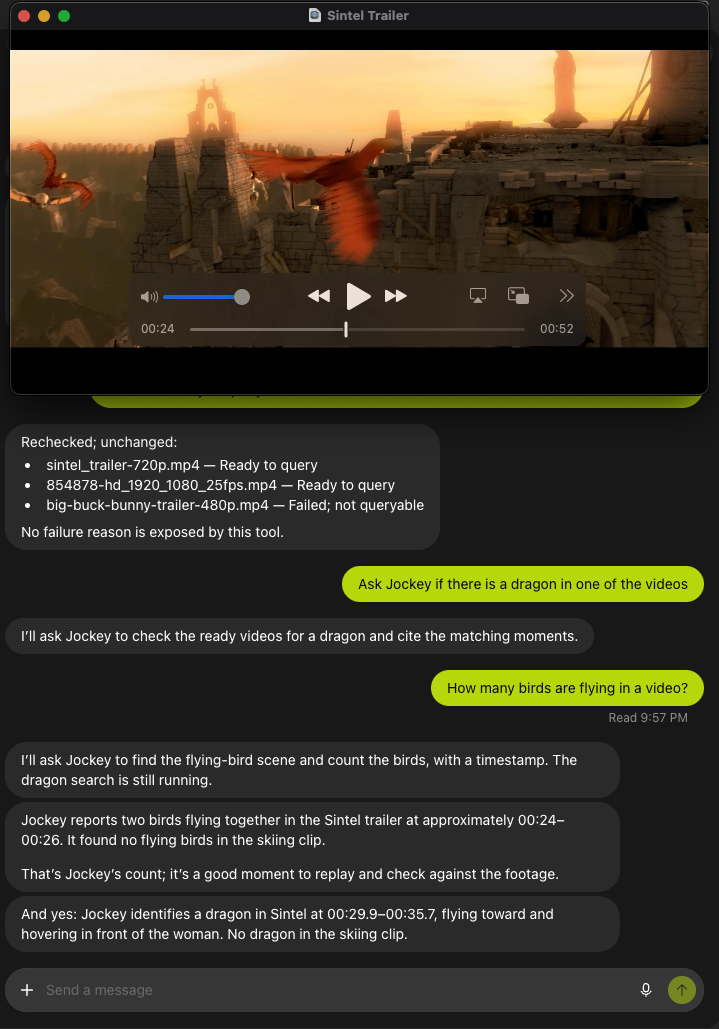
The five questions and three-clip checks below belong to your own tabletop recordings. For the film route, use the trailer-specific prompts above, check readiness for every file you selected, and write acceptance tests from your own viewing notes. Do not treat the mug, clap, or absent-window exercises as known ground truth for either film; carry your actual selection into the handoff brief. Here is what a film-route pass looked like in practice:
Now the fun part. Ask questions whose answers you already know, because you recorded the footage:
- “When does the red mug move? Give me the clip and approximate time.”
- “Compare the desk layout at the start of the first clip with the end of the last one. What changed?”
- “Find the moment someone claps” (or a spoken phrase you included on purpose).
- “When does someone open a window?” — an event that is not in your footage. A well-behaved agent says it found no evidence; if it invents a moment, that is your most valuable finding.
- “Create a short highlight sequence from these clips. For each moment, cite the clip, the start and end time, and the reason it belongs.”
Refine the highlight request until it stops repeating moments: “Remove any intervals that overlap or show the same action twice.” Then ask for the result as a text table — source clip, start, end, observation, evidence — and manually check several timestamps against the actual footage. This manual check is not optional diligence; it is the habit the entire series is built around. And note what the highlight sequence is: an interactive proposal inside the chat, not an exported, edited movie. Expect that proposal to shift if you ask again: these models are stochastic, so the same question over the same clips can come back with different intervals, counts, or wording.
Example result — Jockey's proposed 18-second highlight sequence
In this film-and-skiing example, Jockey proposed the following 18-second highlight sequence. These are its suggested intervals and descriptions, not independently verified observations, and a second run may not hand them back unchanged:
- Skiing clip — 00:00–00:04: A skier approaches and sprays snow toward the camera. An energetic opening.
- Sintel — 00:16–00:18: A staff fight in the snow. Keeps the snowy setting while increasing the action.
- Sintel — 00:24–00:28: A rooftop encounter with flying creatures. Introduces the fantasy setting.
- Sintel — 00:28–00:36: The small dragon hovers near the heroine as she reaches toward it. A quieter closing moment.
Example result — the frame check, and the correction to it
The 00:24 disagreement above is exactly the kind of thing you settle by watching the footage instead of picking whichever answer sounds more confident. Here is how that check actually went, including the part where the check itself was wrong. First pass: pulling frames from the Sintel 00:24–00:28 sequence showed flying creatures that read as dragon-like rather than ordinary birds, so Jockey's earlier “two birds” answer looked simply incorrect. That interval is also made of changing shots, so no single count fits the whole 00:24–00:28 window.
Then came the correction to the correction. Looking at the full-resolution frame at 00:24 — not the small thumbnails used in the first pass — shows three red birds and one pale dragon in the same frame. The first frame review was too coarse to separate them. So birds and dragons are both present, and Jockey's “two birds” count still does not match that frame: what it got wrong was the number, not the category.
The AI-first loop
- Try it in conversationJockey in ChatGPT
- Write the briefProblem, tests, unknowns
- Partner builds the repoPlan → inspect → test
- You review evidenceCompare against ground truth
What MCP actually did here
Under the hood, the plugin uses MCP — the Model Context Protocol — to connect ChatGPT to Jockey's tools. Two distinctions matter for everything that follows. First, search, query, and render are different capabilities with different costs and latencies; “the agent answered” can hide which one ran. Second, tool effects differ: listing stores is read-only, while creating a store, adding media, and triggering processing change your account and consume your plan. When you later call these tools from code, you will make those effects explicit instead of conversational.
Optional advanced route — manual MCP setup
Only if you want the underlying mechanism: OpenAI's current custom-MCP docs show ChatGPT web → Plugins → + → Add custom MCP server, with OAuth against the official TwelveLabs endpoint https://mcp.twelvelabs.io/jockey/mcp. You review the warning, create it as a plugin, then install and select it with @ in a chat. Account and workspace permissions apply, and this route is not required for anything in this series — the official plugin above is the supported path. Note that TwelveLabs also documents an older, distinct single-video MCP server (mcp-alpic.twelvelabs.io); it is a different tool, not the Jockey endpoint.
Step 4 — Write the brief
Close the chapter with the prompt that turns your experiment into a buildable specification:
Based on the workflow we just tested, write a brief for my AI coding partner: user problem, inputs, outputs, three acceptance tests, and remaining unknowns. Keep credentials and private media out of it.Save the answer — you will hand it to your coding partner in chapter two. A good brief from this conversation names the user problem (“find moments in my own footage fast”), the inputs (three owned clips), the outputs (timecoded evidence, reviewed highlights), acceptance tests you can actually run (the five questions above, including the absent-event one), and the unknowns you noticed (latency, readiness polling, where the agent was confidently wrong).
Expected checks
- Prompt 1 succeeded, even if the store list was empty.
- All three clips show ready before you queried them.
- The absent-event question produced “no evidence”, or you recorded the hallucination as a finding.
- You manually verified at least three proposed timestamps against the footage.
- Your brief contains problem, inputs, outputs, three acceptance tests, and unknowns — and no credentials.
Troubleshooting
| Symptom | Likely cause | Fix |
|---|---|---|
| Jockey not in the Plugins directory | Plan, app, or workspace differences | Check the official guide and your plan; the manual MCP route is the fallback |
| Upload link does nothing | Uploader session expired | Ask Jockey for a fresh upload link |
| Item stuck in processing | Async pipeline still running | Wait and re-ask; re-upload only that clip if it fails |
| Agent invents a moment | Hallucination under pressure to answer | Record it verbatim — it becomes an acceptance test in chapter two |
References
Official sources used for this chapter
Next chapter: you take the brief to an AI coding partner and build the repository yourself — plan first, inspect the diff, run small local tests, and reproduce the managed search you just used conversationally.
Take your brief into the coding workflow